Showing posts with label technology. Show all posts

Sunday, March 13, 2016

Wikipedia’s new iOS app focuses on discovery, personalization

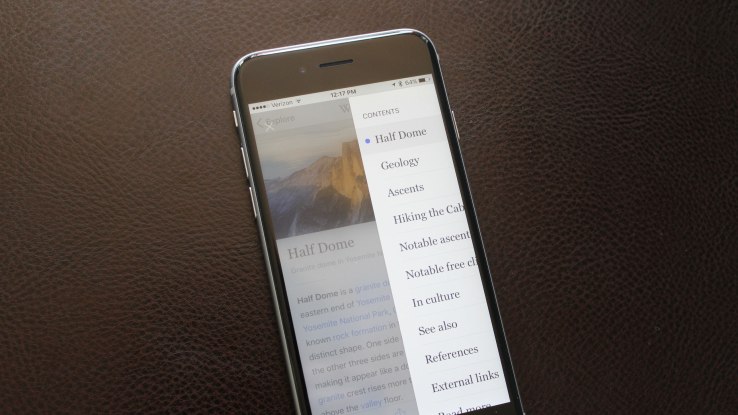
Wikipedia today launched an upgraded version of its iOS application aimed at helping users better discover content matching their own interests, including both articles and images. In addition, the app has been optimized for Apple’s newer OS and latest iPhones (6s and 6s Plus) with support for 3D Touch and Spotlight Search integrations.
This is the latest in a series of efforts from the organization to make its mobile application something users turn to for more than everyday fact-checking purposes.
In the past, those efforts have included the rollout of more utilitarian features like offline access and mobile editing, as well as an experiment with going social by way of shareable “fact cards,”  which were added last year. (That feature is still supported, but has been made less prominent. You now have to select text to “share a fact.”)
In the latest version, Wikipedia focuses more heavily on finding interesting things to read and personalization. That is, it presents users with a new “Explore” feed that showcases a combination of the top read articles, the featured article and featured picture of the day, random articles, and nearby articles, in addition to those recommended based on how you’ve been using the app previously. These latter suggestions will be related to what you read on the app, the organization says.
In addition, the update includes support for navigating using multi-touch gestures (including swipe, tap and 3D Touch), as well as 3D Touch from the app’s icon on the homescreen. This will let you open search, read a random article, see nearby articles, or continue reading your latest. Another iOS-specific feature, Handoff, is now supported in this release, too.
Finally, a feature that you save articles to read later, which are also available offline, arrived along with improvements to image galleries and tools to more easily share articles via social media or email.
The extent any of these changes – or those in the past – are having on Wikipedia’s traction on iOS is less certain. The app remains top-ranked in the “Reference” category on the App Store, where it’s usually in the top 15 or 20 (Though, lately it dropped a bit to the 30’s.) However, it’s certainly not one of the most popular “Overall” apps on the iPhone, despite its brand-name awareness.
The problem is that many people don’t think of Wikipedia as a place they want to explore, but rather a place to look something up. And the fact that its web content has been surfaced through Apple’s Spotlight Search since iOS 8 likely satisfies most in need of a quick fact check. Wikipedia is still trying to find the sweet spot in terms of making its iOS app something that would be more regularly launched, but it’s not a certainty that simply rolling out a better “explore” feed will do the trick.
That said, the app is well-designed and highly polished, and worth the download for those who would rather learn something in their free time rather than goof off on Snapchat or Vine. The updated Wikipedia app is live now on the iTunes App Store.

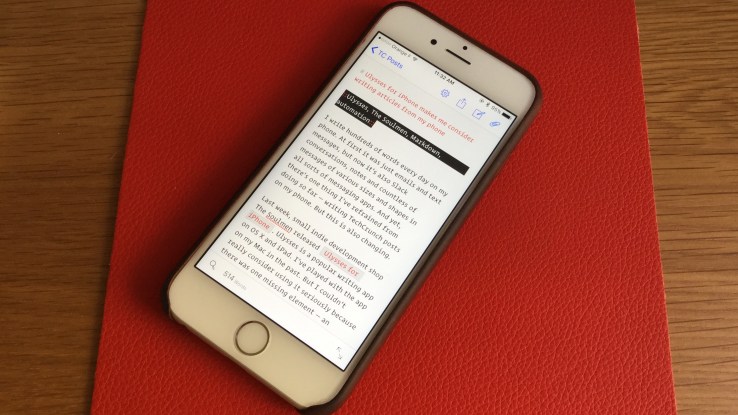
    Ulysses for iPhone makes me consider writing articles on my phone

    I write hundreds of words every day on my phone. At first it was just emails and text messages, but now it's also Slack conversations, notes and countless of messages of various sizes and shapes in all sorts of messaging apps. And yet, there's one thing I've refrained from doing so far — writing TechCrunch posts on my phone. But this is also changing.
    Earlier this week, small indie development shop The Soulmen released Ulysses for iPhone. Ulysses is a popular writing app on OS X and iPad. I've played with the app on my Mac in the past. But I couldn't really consider using it seriously because there was one missing element — an iPhone app.
    Ulysses is a Markdown text editor for small and big projects. It works quite well for anything between a blog post and a novel. And Ulysses is also the kind of apps we need on iOS. It's an expensive $25 app that provides nearly all the features of its desktop equivalent. In other words, it's a serious app to do serious work with a clear business model. And of course, everything stays in sync between the different versions of the apps.
    And this is key to understanding how Ulysses stands out. I can now start a draft on my phone, edit it on my iPad, give it a final look on my Mac and publish it on this website. I've already written a handful of drafts in Simplenote on my iPhone in the past. But this is a much more streamlined process.
    Ulysses is a polished iOS app that lets you write, organize and export your writing in different formats. It's a well-designed, versatile app that is worth trying if you write every day. It competes with many other apps, such as Editorial and 1Writer on iOS, and Scrivener on OS X.
    I wanted to take Ulysses one step further and make it work seamlessly with our CMS — WordPress. I started with Ulysses for OS X. With a few clicks, I can now run a Ruby script that sends my draft to our backend so that I just have to review it, tweak a few options and publish it.
    But what about iOS? You can't do that on iOS right? Feeling inspired by iOS automation wizardFederico Viticci, I tried to recreate my OS X script on iOS. And sure enough, automation appWorkflow lets you do that just fine. I can now post to WordPress from Ulysses and auto-fill the headline, tags and excerpt using this workflow. Another workflow lets me upload images to WordPress from iOS.
    I've already written a few posts using this process and it's been even more useful than I expected. I already spend so much time typing on my iPhone that I can type nearly as fast on my iPhone as on my Mac. But in many cases, it's much more convenient to write on my phone. In fact, this post was written on my phone.

    Play your Steam first-person shooters in full virtual reality with MyDream Swift

    As the launch dates of the Oculus Rift and the HTC Vive virtual reality headsets approach, so does the release of a ton of awesome VR gaming content. To gamers with full Steam libraries however, it’s kind of a shame that once they put the headset on, most of their favorite content is no longer available to enjoy.
    MyDream Swift is looking to bring old Steam content into the next generation of gaming with its VR conversion software that brings experiences like Battlefield and Borderlands into immersive virtual reality.
    You can try any DX9 or DX11 game (i.e. most popular games) with the software, but it’s definitely optimized for first-person shooter-style POV experiences. For the non-FPS titles that feel a bit wonky in VR due to camera perspectives, the app also has a cinema mode that gives you a “near distant” virtual screen setup to view and dive into familiar titles within the VR headset.
    The team didn’t set out to build a piece of software like Swift, initially they were just looking to convert their own game MyDream, a creative community game that lets players build their own 3D worlds, into a virtual reality experience.
    The Swift UI isn’t all that flashy, but it’s about as simple as it gets. Check a box for “Cinema mode,” select your title and you’re good-to-go. Looking to dive into full VR for a first-person game? Just check “AutoVR” and “first-person camera controls,” launch the game and get to playing.
    The team says that games convert with lossless quality and maintain 90hz render times so everything should look smooth, though Swift notably foregoes stereoscopic rendering for the sake of performance. I was given a remote demo of the software, but when it comes to VR you really have to try it in-person to see how experiences stack up. MyDream understands this as well and told me that they’ll be offering demos at VRDC in San Francisco this week to anyone who wants to take the software for a whirl.
    MyDream Swift is available for pre-order now for $29.99 and is available for download on March 28. The $30 buy also includes MyDream VR, the company’s latest iteration of its namesake gaming title.